
NOTE: You do not have to “memorise” the code examples below, but you must be able to understand what each line of code does! You will be expected to explain each algorithm and compare them, discussing Big O notation.
Big O Notation
Big O notation is a mathematical concept used to describe and classify algorithms based on how their runtime or space requirements grow as the input size increases. It identifies the efficiency of an algorithm.
Linear – O(n)
- The algorithm’s time or space complexity increases proportionally with the input size.
- Linear search: Often characterised by a single loop over the input data.
- Example: Finding an item in an unsorted list by checking each element one by one.
Logarithmic – O(log n)
- Complexity increases logarithmically, which is significantly faster than linear growth for large inputs.
- Binary Search: A typical example where the dataset is halved each step.
- Efficient Scaling: Performance degrades slowly as the input size increases.
Constant – O(1)
- The operation takes the same amount of time or space regardless of input size.
- Direct Access: Examples include accessing an array element by index.
- No Loops: No use of loops or recursive calls that depend on the input size.
Quadratic – O(n²)
- Performance is proportional to the square of the input size.
- Nested Loops: Typically found in algorithms with two nested loops over the input data.
- Slow: Becomes impractical for large inputs due to the rapid increase in time or space required.
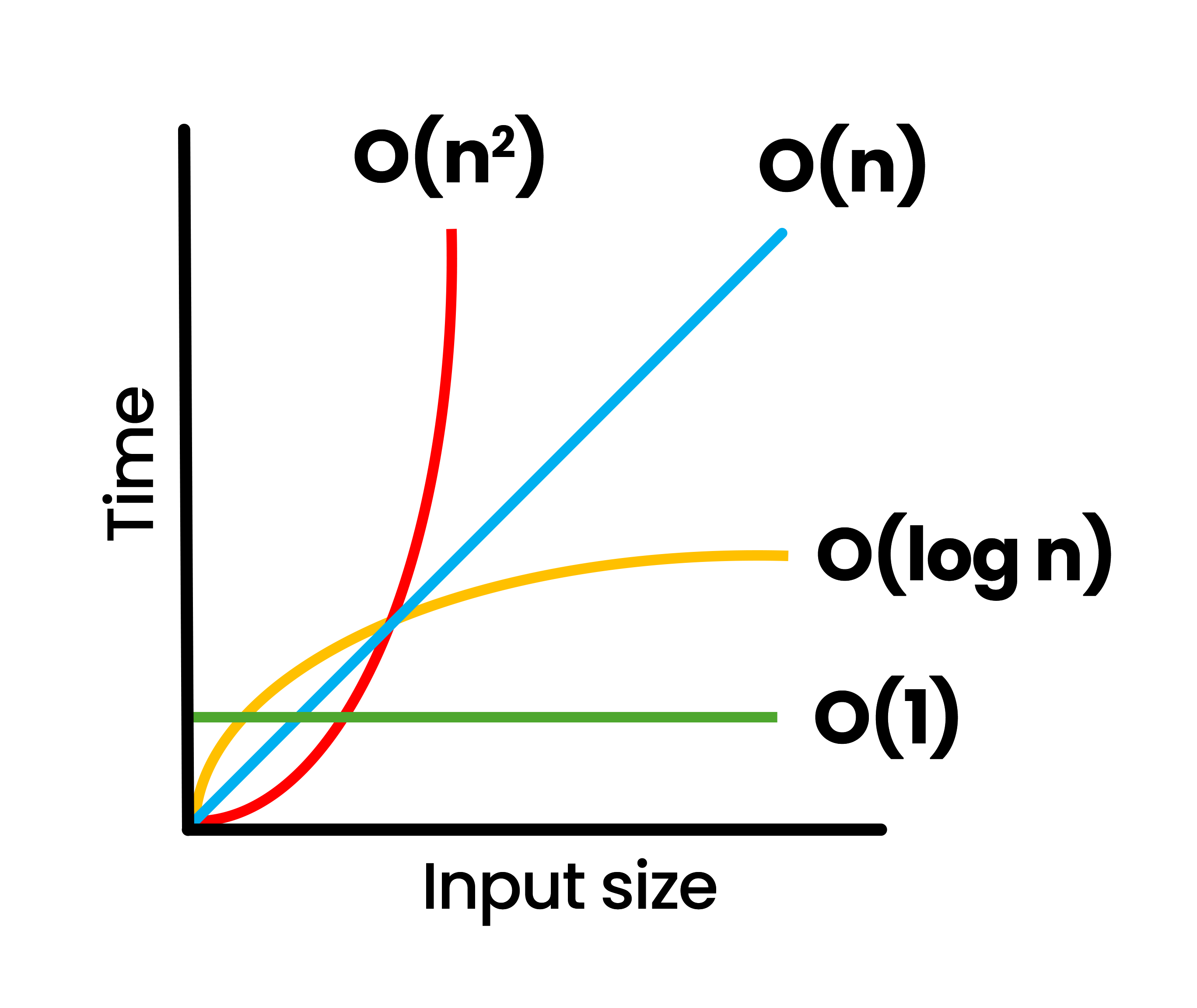
These algorithms’ Big O notation is based on the worst-case scenario – this is what the exams typically look for.
Search Algorithms
Linear Search – O(n) linear time complexity
The linear search algorithm iterates over all elements in the list and checks whether each element equals the target value. The list does not need to be sorted. This is an inefficient algorithm.
# O(n) linear time complexity
def linear_search(lst, target):
    for i in range(len(lst)):
        if lst[i] == target:
            return i
    return -1 # if target is not found

def main():
    index = linear_search([1, 3, 5, 7, 9, 11, 13, 15, 17, 19], 11)
    # index will be 5
    print(index)
Binary Search – O(log n) logarithmic time complexity
Binary search is an efficient algorithm for finding an item in a sorted list. It repeatedly divides in half the portion of the list that could contain the item, until you’ve narrowed down the possible locations to just one. This is more efficient than a linear search, but the list must be sorted.
# O(log n) logarithmic time complexity
def binary_search(lst, target):
    low = 0
    high = len(lst) - 1

    while low <= high:
        mid = (low + high) // 2 # Two // rounds the division down
        guess = lst[mid]
        if guess == target:
            return mid  # Target found, return index
        elif guess > target:
            high = mid - 1  # Target is in the left half
        else:
            low = mid + 1  # Target is in the right half

    return -1  # Target is not in the list

def main():
    sorted_list = [1, 3, 5, 7, 9, 11, 13, 15, 17, 19]
    target_value = 11

    index = binary_search(sorted_list, target_value)
    if index != -1:
        print(f"Target found at index: {index}")
    else:
        print("Target not found in the list.")
Sort Algorithms
Bubble Sort – O(n2) quadratic time complexity
Bubble sort is a sorting algorithm that repeatedly steps through the list, compares adjacent elements, and swaps them if they are in the wrong order. The algorithm gets its name because smaller elements “bubble” to the top of the list.
# O(n^2) quadratic time complexity
def bubble_sort(lst):
  n = len(lst)
  for i in range(n):
    for j in range(0, n - i - 1):
      if lst[j] > lst[j + 1]:
        temp = lst[j]
        lst[j] = lst[j+1]
        lst[j+1] = temp
  return lst

def main():
  sorted_list = bubble_sort([64, 34, 25, 12, 22, 11, 90])
  print(sorted_list)  # Output will be [11, 12, 22, 25, 34, 64, 90]
Insertion Sort – O(n2) quadratic time complexity
Insertion sort is a simple sorting algorithm that builds the final sorted array one item at a time by comparing each new element to the already sorted portion and inserting it into the correct position.
# O(n^2) quadratic time complexity
def insertion_sort(lst):
    for i in range(1, len(lst)):
        key = lst[i]
        j = i - 1

        while j >= 0 and key < lst[j]:
            lst[j + 1] = lst[j]
            j -= 1

        lst[j + 1] = key

    return lst

def main():
  sorted_list = insertion_sort([64, 34, 25, 12, 22, 11, 90])
# sorted_list will be [11, 12, 22, 25, 34, 64, 90]Selection Sort – O(n2) quadratic time complexity
Selection sort divides the input list into two parts: a sorted sublist of items which is built up from left to right at the front (left) of the list, and a sublist of the remaining unsorted items. On each iteration, the smallest (or largest, depending on sorting order) remaining element from the unsorted sublist is found and moved to the end of the sorted sublist.
# O(n^2) quadratic time complexity
def selection_sort(lst):
  n = len(lst)
  for i in range(n):
    # Find the minimum element in remaining unsorted array
    min_idx = i
    for j in range(i + 1, n):
      if lst[min_idx] > lst[j]:
        min_idx = j
    # Swap the found minimum element with the first element
    temp = lst[i]
    lst[i] = lst[min_idx]
    lst[min_idx] = temp
  return lst

def main():
  sorted_list = selection_sort([64, 34, 25, 12, 22, 11, 90])
  # sorted_list will be [11, 12, 22, 25, 34, 64, 90]
  print(sorted_list)